Category: Amazfit T-Rex Updates

  • Amazfit T-Rex 3 Pro Update 4.5.3.3 Improves BioCharge & Freediving Workouts

    Amazfit T-Rex 3 Pro Update 4.5.3.3 Improves BioCharge & Freediving Workouts

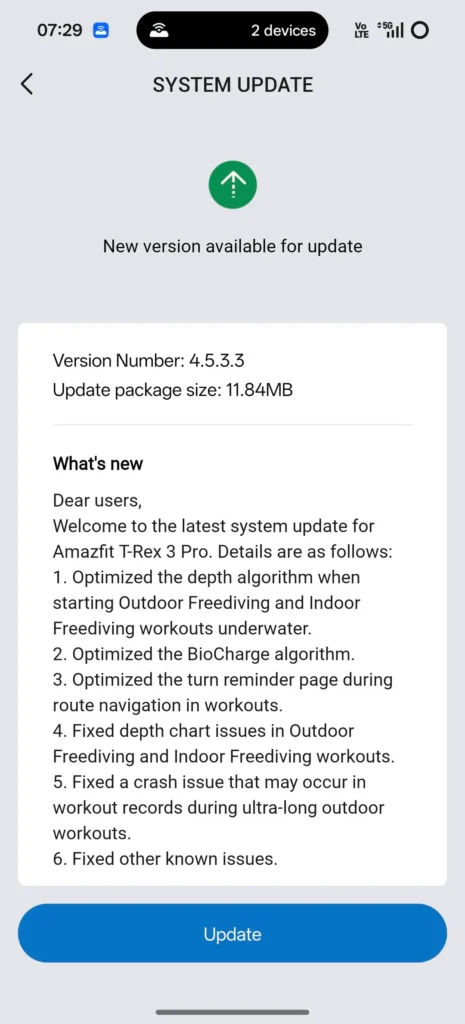
    Amazfit is now rolling out a new 4.5.3.3 software update for the Amazfit T-Rex 3 Pro smartwatch. The new software brings major optimizations to health and fitness services and fixes known bugs. The update package is 11.84MB and is now available to install in major countries.

    Amazfit T-Rex 3 Pro 4.5.3.3 Firmware

    The released changelog details reveal that it has optimized the depth algorithm when starting outdoor and indoor freediving workouts on the Amazfit T-Rex 3 Pro. The fix has also been applied to freediving workouts, where Amazfit has resolved the depth chart issue.

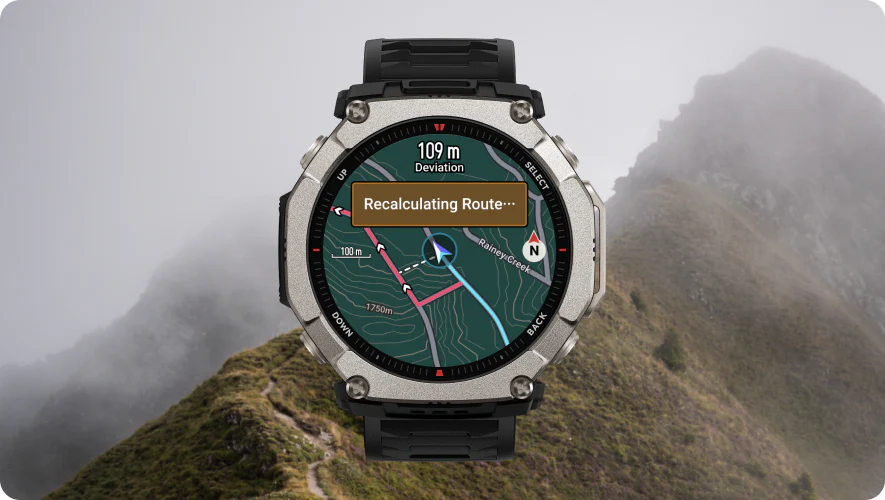
    Further, it has improved and optimized the BioCharge feature. The software enhancement also optimizes the turn reminder page during route navigation in workouts. Finally, it fixes a crash issue in workout records during ultra-long outdoor exercises. Apart from that, users will notice better system stability and improved security, as the company has fixed minor bugs.
    Amazfit T-Rex 3 Pro New Update

    Amazfit T-Rex 3 Pro 4.5.3.3 Detailed Changelog

    1. Optimized depth algorithm when starting indoor and outdoor freediving workouts underwater
    2. Optimized the BioCharge algorithm
    3. Optimized the turn reminder page during route navigation in workouts
    4. Fixed depth chart issues in indoor and outdoor freediving workouts
    5. Fixed a crash issue that may occur in workout records during ultra-long outdoor workouts
    6. Fixed other known bug issues

    How to Install

    The update is being released in all major countries, so you should check for the new firmware version. Amazfit T-Rex 3 Pro users can manually check for the update by following the steps below.

    1. Open the Zepp app
    2. Go to Devices
    3. Select Amazfit T-Rex 3 Pro
    4. Scroll down and click the General option
    5. Tap on System Update
    6. Download the new update

    It is the first update of this month, and more watches like Amazfit T-Rex Ultra 2 and Bip 6 might also receive security updates in the coming few days.
    Source

  • Amazfit T-Rex Ultra 2 Update 3.1.6.1 Brings Big Outdoor Improvements

    Amazfit T-Rex Ultra 2 Update 3.1.6.1 Brings Big Outdoor Improvements

    Just days after launch, the Amazfit T-Rex Ultra 2 is already receiving its first major software update. The new 3.1.6.1 firmware version adds offline route planning, scuba diving support, grade-adjusted pace, optimized maps and navigation services, and a built-in flashlight, making it even more powerful for outdoor adventurers.

    Flashlight & Voice Memo Added

    The update brings Night Mode vision to the Control Center and activates green and white flashlight options, which are useful for outdoor activities in low-light conditions.

    Like Coros watches, the Amazfit T-Rex Ultra 2 now includes a voice note feature. Users can pin voice notes to their running or hiking sessions and later review them along with their previous workouts.

    Amazfit T-Rex Ultra 2 First Update

    Biocharge & New Coordinate Optimization

    A new Biocharge function has been added to monitor multi-dimensional health metrics and determine day-to-day health status.

    The update also supports additional coordinate formats and coordinate systems. Users can access these options through Settings > Preferences > Coordinates.

    For deep-water activities, the watch now includes a recreational scuba diving mode, allowing users to explore underwater environments more effectively.

    Grade-Adjusted Pace Added

    With grade-adjusted pace, runners can better understand their true effort when running uphill or downhill — a major advantage for trail runners.

    You can enable this feature by going to:
    Outdoor Running / Trail Running > Workout Settings > More > Data Page > Pace > Grade-Adjusted Pace / Avg Grade-Adjusted Pace

    Improved Maps & Navigation

    The Map app now supports offline navigation planning, route planning during workouts, and the ability to create round-trip courses during running sessions. This section has also been optimized to improve performance and overall usability.

    Overall, with this first software update, Amazfit has added several important features and improved core outdoor functions.

    How to Download the New 3.1.6.1 Firmware

    To install the latest update, follow these steps:

    1. Open the Zepp app
    2. Go to Devices
    3. Select Amazfit T-Rex Ultra 2
    4. Scroll down and choose General
    5. Tap on System Update

    The firmware is rolling out gradually, so it may take some time to reach all users.

    Source

  • New 4.4.2.3 Software Released for T-Rex 3 Pro, Improves Services

    New 4.4.2.3 Software Released for T-Rex 3 Pro, Improves Services

    Last week, the regular Amazfit T-Rex 3 received a 4.4.2.3 software update with a couple of optimizations and enhancements. Now, the same software has been released for its Pro variant. The T-Rex 3 Pro smartwatch in many countries is receiving the same firmware with the same aim: to improve system stability. The changelog mentions it launched to optimize indoor cycling workouts. When users connect it to supported equipment, the necessary chart and data will automatically open on the display.

    The weather data logic has also been optimized to get accurate information. In some cases, if the workout location fails to load weather information, then the watch will not give false data. The Map app and workout track will now give you a shortcut on the main display to view navigation and other information. Also, to make it easy, the navigation arrow will always show the north direction. Users can also get it from compass app, but it is better to have it in other functions.

    New Amazfit T-Rex 3 Update

    Zepp Health has further optimized the activity reminder mechanism, reminder messages, and app notifications. Users can feel enhanced performance from the smartwatch after the latest version. The new firmware is now rolling out in all the major countries, including China, India, Europe, and the United States. To improve the overall user experience of the Amazfit T-Rex 3 Pro, you should install it.

  • Amazfit T-Rex 3 Grabs a Couple of Features in v3.9.4.4 Version

    Amazfit T-Rex 3 Grabs a Couple of Features in v3.9.4.4 Version

    Zepp Health has released one of the major updates of this year to the Amazfit T-Rex 3 smartwatch. In the latest V3.9.4.4 firmware version, the watch gets a couple of new features along with other key changes and bug fixes. Sadly, it has missed the latest Zepp OS 5.0 software, which the company has recently seeded on the Amazfit Bip 6. Users were eagerly waiting for the next Zepp OS, but the company didn’t roll it out. Meanwhile, in the current update, the company listened to users by bringing vital changes.

    The Amazfit T-Rex 3 has received a new HYROX training workout. Apart from that, the newly added and other Cross Training, HIIT workouts now support AMRAP, TABATA, and EMOM modes, including timers and training templates. After Bip 6, this watch also gets the Zoom feature for display, which magnifies specific areas on the screen.

    Amazfit T-Rex 3 Update

    Further, the new software optimizes Zepp Coach, Weather app, Map interaction, and beep & vibration alerts to get better outputs. The company also improves synchronization of the latest workout data and refines the text description for full Recovery Time in the workout status app.

    In the Zepp Coach app, users can now easily see their daily workout charts to compare and improve their performances. Finally, Zepp Health has fixed some known bugs in the code to stabilize the overall performance. To install the new V3.9.4.4 firmware version on the Amazfit T-Rex 3, open the official pairing app and check for a new update.